
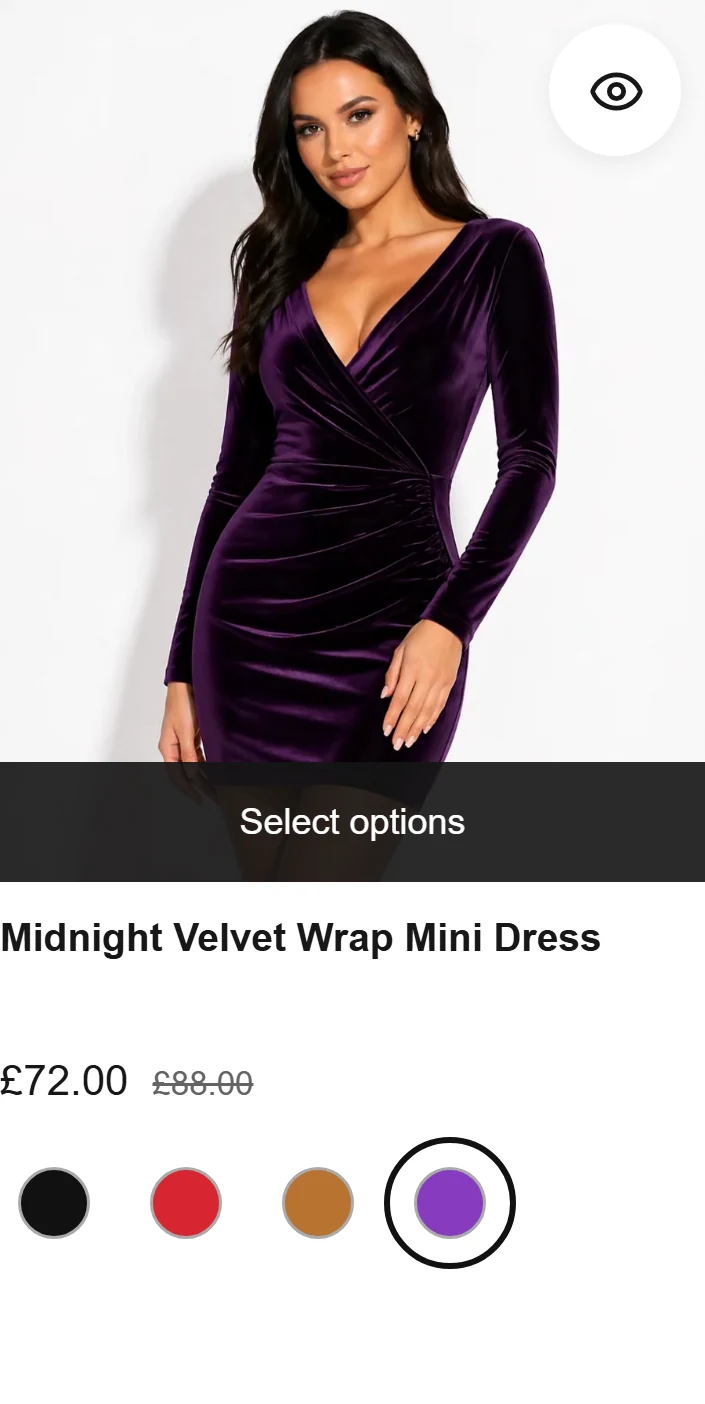
Inspect the colour change on the card
The approved capture pairs a selected swatch with its product photograph, a small interaction you can inspect before comparing suite breadth.
See the evidenceShopify comparison guide
Choose FilterIQ when a clear price, colour and size journey plus reviewable filter-set organisation is the decision. Boost Commerce publishes a wider search, recommendation and bundle suite; its Shopify App Store listing currently says the app is unavailable, so confirm an access route directly with Boost.
FilterIQ in practice
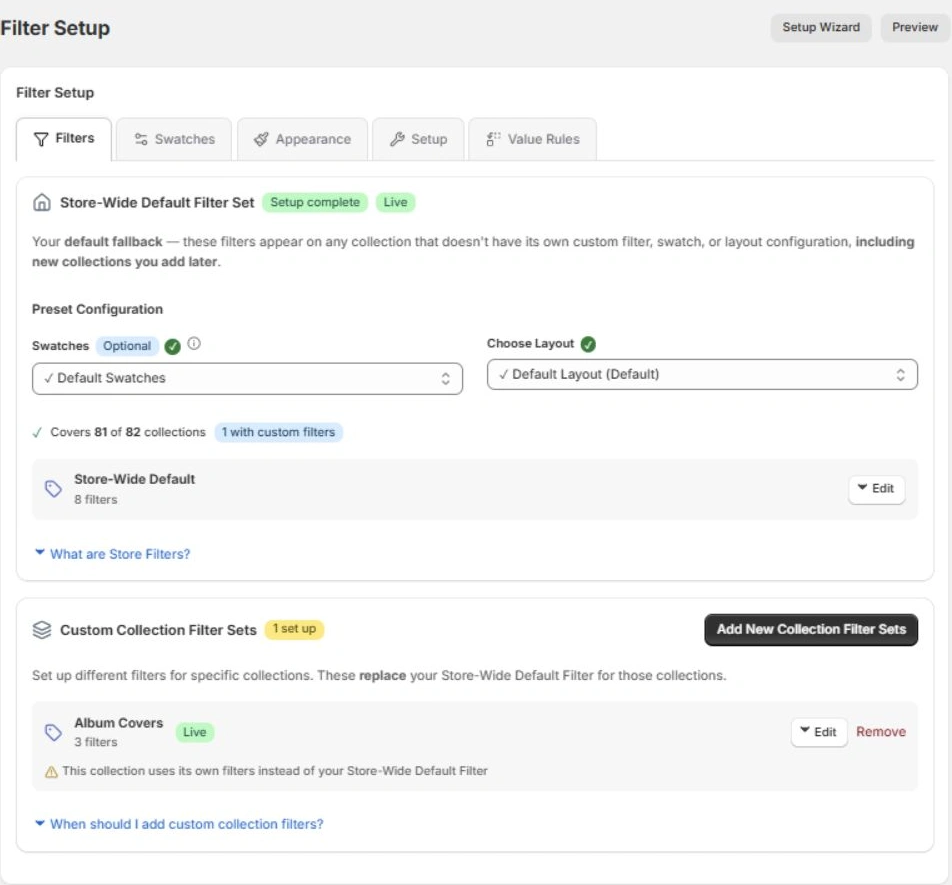
The on-site demo shows all four swatches for one dress. Selecting Purple updates its product-card photograph. The Filter Setup capture shows how sets are organised, not a publish action.
These captures include both the source storefront and the on-site 12-product preview, so counts can differ. Use the preview to try a query, change a filter and inspect the result, then review the setup on your own theme.
Try FilterIQ's working catalogueInspect the evidence
All four available colours are visible on the card. Selecting Purple changes the Midnight Velvet dress photograph.
On-site 12-product catalogue preview; prices and availability are a captured sample. · Captured 2026-10-21. Open interactive demo
Open full-size capture by selecting the image. Open original fileThe approved Filter Setup capture shows a store-wide default and a collection-specific filter set. It does not demonstrate the publish action.
The Filter Setup screen shows a store-wide default filter set and a custom Album Covers collection filter set.
Read-only view of FilterIQ filter setup for the ThatGig example store. Editing and publishing were not shown. · Captured 2026-10-19.
Open full-size capture by selecting the image. Open original fileThe approved capture pairs a selected swatch with its product photograph, a small interaction you can inspect before comparing suite breadth.
See the evidenceThe approved Filter Setup capture shows a store-wide default and a collection-specific set. Ask to inspect the complete workflow on your theme.
See the evidenceCompare your required discovery controls with Boost's available offer and GMV tier; confirm its current access route.
See the evidenceDecision checklist
Provider information reviewed 2026-10-21. These are published descriptions, not independent performance results. Check current plan terms and test both experiences on your own store.
| Question | FilterIQ | Boost Commerce | Buyer check |
|---|---|---|---|
| Shopper experience | |||
| What happens as a shopper types? | Shown in demo The demo catalogue shows search suggestions and product previews for a typed query; relevance on your own products needs testing. Working catalogue | Plan-dependent Boost advertises smart search and AI-powered search; confirm the current product and plan you can access. Source 1: Boost Commerce pricing and features | Try three frequent queries and one misspelling on your own products. |
| Can shoppers combine useful filters? | Shown in demo The 12-product preview lets shoppers combine price, colour and size; a £30–£80 range leaves six sample products in the new capture. Working catalogue | Provider-published Boost publishes advanced product filters and metafield support across its current pricing page. Source 1: Boost Commerce pricing and features | Test price, colour, size and a catalogue-specific attribute together. |
| Do product choices remain clear? | Shown in demo The approved captures show a colour swatch changing a product card and size selection in quick view. Verify your variant data and theme. Filter and product-card evidence | Plan-dependent Variant display appears in Boost's Accelerate tier; confirm the required product-card behaviour and written plan. Source 1: Boost Commerce pricing and features | Check variant photos, available sizes and quick view on your theme. |
| Merchant control | |||
| Which product data powers a filter? | Documented preview Shopify product fields, variant options and configured metafields can supply filters. Confirm each source and renderer in your preview. Filter source guide | Provider-published Boost publishes metafield filters. Check your precise source mapping and display settings in a trial. Source 1: Boost Commerce pricing and features | Map your options and metafields; inspect missing or inconsistent values. |
| Can collections have different choices? | Shown in demo Filter Setup shows store-wide and collection filter sets. The approved admin capture demonstrates organisation, not publishing. Filter Setup capture and guide | Plan-dependent Collection merchandising appears from Boost's Convert tier. Verify scope and collection-specific filter setup. Source 1: Boost Commerce pricing and features | Show a general collection and a specialist collection side by side. |
| How are products promoted or hidden? | Documented preview Pin, boost, demote and hide rules are documented. Scope, eligibility and priority affect the result; no relative ranking advantage is established. Merchandising scope | Plan-dependent Boost lists commerce search and collection merchandising with plan distinctions. Source 1: Boost Commerce pricing and features | Test one scoped rule and inspect the resulting product order. |
| Can staff review before publishing? | Documented preview Draft, review and publish are documented for the private preview. The approved admin image does not prove the full publish workflow. Publishing guide | Unverified The pricing page does not establish the exact review/publish/rollback workflow for your store. Source 1: Boost Commerce pricing and features | Ask for the exact draft, preview, publish and rollback path. |
| Evidence and operations | |||
| What can the team measure? | Documented preview Search and filter analytics are plan-scoped and depend on tracking configuration and shopper consent. Inspect the events available to your store. Analytics scope | Plan-dependent Boost lists plan-dependent analytics history. Confirm events, consent handling and retention on your offer. Source 1: Boost Commerce pricing and features | Compare actual event coverage, consent rules and report access. |
| Are recommendations and bundles needed? | Unverified Equivalent recommendations, behavioural personalization and a completed merchant experiment workflow are unverified for this preview. Experiment boundary | Plan-dependent Recommendations and bundles are part of Boost's published suite; personalization depends on tier. Source 1: Boost Commerce pricing and features | List the Boost features your store uses, then check each feature and its tier in writing. |
| Will it fit the theme and Markets setup? | Shown in demo The demo and documentation show a mobile filter drawer. Confirm theme, Markets and translated-catalogue behaviour on your store. Mobile filter evidence | Provider-published Boost lists theme/app integrations and Shopify Markets features; test your actual theme and markets. Source 1: Boost Commerce pricing and features | Test mobile, translations and the published theme before switching. |
| Commercial terms | |||
| How does monthly GMV change the bill? | Documented preview Configured catalogue tiers and AI credits are indicative. Compare the accepted preview offer, not an assumed live bill. FilterIQ preview pricing | Provider-published Boost's current pricing tiers are based on average monthly GMV; confirm thresholds and any other charges in writing. Source 1: Boost Commerce pricing and features | Model current and projected GMV against Boost's written tier thresholds. |
| What can the store trial now? | Documented preview FilterIQ is in private preview. Free access and 14-day paid self-serve trials are the intended offer; confirm availability and terms. FilterIQ preview availability | Plan-dependent Boost's pricing page advertises a trial; verify current eligibility and access directly with Boost. Source 1: Boost Commerce pricing and features | Confirm current availability, trial terms and support in writing. |
The demo catalogue shows search suggestions and product previews for a typed query; relevance on your own products needs testing.
Working catalogueBoost advertises smart search and AI-powered search; confirm the current product and plan you can access.
Source 1: Boost Commerce pricing and featuresBuyer checkTry three frequent queries and one misspelling on your own products.
The 12-product preview lets shoppers combine price, colour and size; a £30–£80 range leaves six sample products in the new capture.
Working catalogueBoost publishes advanced product filters and metafield support across its current pricing page.
Source 1: Boost Commerce pricing and featuresBuyer checkTest price, colour, size and a catalogue-specific attribute together.
The approved captures show a colour swatch changing a product card and size selection in quick view. Verify your variant data and theme.
Filter and product-card evidenceVariant display appears in Boost's Accelerate tier; confirm the required product-card behaviour and written plan.
Source 1: Boost Commerce pricing and featuresBuyer checkCheck variant photos, available sizes and quick view on your theme.
Shopify product fields, variant options and configured metafields can supply filters. Confirm each source and renderer in your preview.
Filter source guideBoost publishes metafield filters. Check your precise source mapping and display settings in a trial.
Source 1: Boost Commerce pricing and featuresBuyer checkMap your options and metafields; inspect missing or inconsistent values.
Filter Setup shows store-wide and collection filter sets. The approved admin capture demonstrates organisation, not publishing.
Filter Setup capture and guideCollection merchandising appears from Boost's Convert tier. Verify scope and collection-specific filter setup.
Source 1: Boost Commerce pricing and featuresBuyer checkShow a general collection and a specialist collection side by side.
Pin, boost, demote and hide rules are documented. Scope, eligibility and priority affect the result; no relative ranking advantage is established.
Merchandising scopeBoost lists commerce search and collection merchandising with plan distinctions.
Source 1: Boost Commerce pricing and featuresBuyer checkTest one scoped rule and inspect the resulting product order.
Draft, review and publish are documented for the private preview. The approved admin image does not prove the full publish workflow.
Publishing guideThe pricing page does not establish the exact review/publish/rollback workflow for your store.
Source 1: Boost Commerce pricing and featuresBuyer checkAsk for the exact draft, preview, publish and rollback path.
Search and filter analytics are plan-scoped and depend on tracking configuration and shopper consent. Inspect the events available to your store.
Analytics scopeBoost lists plan-dependent analytics history. Confirm events, consent handling and retention on your offer.
Source 1: Boost Commerce pricing and featuresBuyer checkCompare actual event coverage, consent rules and report access.
Equivalent recommendations, behavioural personalization and a completed merchant experiment workflow are unverified for this preview.
Experiment boundaryRecommendations and bundles are part of Boost's published suite; personalization depends on tier.
Source 1: Boost Commerce pricing and featuresBuyer checkList the Boost features your store uses, then check each feature and its tier in writing.
The demo and documentation show a mobile filter drawer. Confirm theme, Markets and translated-catalogue behaviour on your store.
Mobile filter evidenceBoost lists theme/app integrations and Shopify Markets features; test your actual theme and markets.
Source 1: Boost Commerce pricing and featuresBuyer checkTest mobile, translations and the published theme before switching.
Configured catalogue tiers and AI credits are indicative. Compare the accepted preview offer, not an assumed live bill.
FilterIQ preview pricingBoost's current pricing tiers are based on average monthly GMV; confirm thresholds and any other charges in writing.
Source 1: Boost Commerce pricing and featuresBuyer checkModel current and projected GMV against Boost's written tier thresholds.
FilterIQ is in private preview. Free access and 14-day paid self-serve trials are the intended offer; confirm availability and terms.
FilterIQ preview availabilityBoost's pricing page advertises a trial; verify current eligibility and access directly with Boost.
Source 1: Boost Commerce pricing and featuresBuyer checkConfirm current availability, trial terms and support in writing.
Provider information reviewed 2026-10-21. Prices, features and availability can change; check the provider's current terms before deciding.
Boost may fit better when recommendations, bundles, collection merchandising or integrations are essential and Boost can confirm access and the plan that includes them. Its published pricing uses GMV bands, so compare the full offer at your current and projected sales.
Test your queries and representative products, inspect the setup on your theme and compare written commercial terms. If you switch, plan access, acceptance checks and rollback before changing the live storefront.